 Have you tried DatVault Yet?
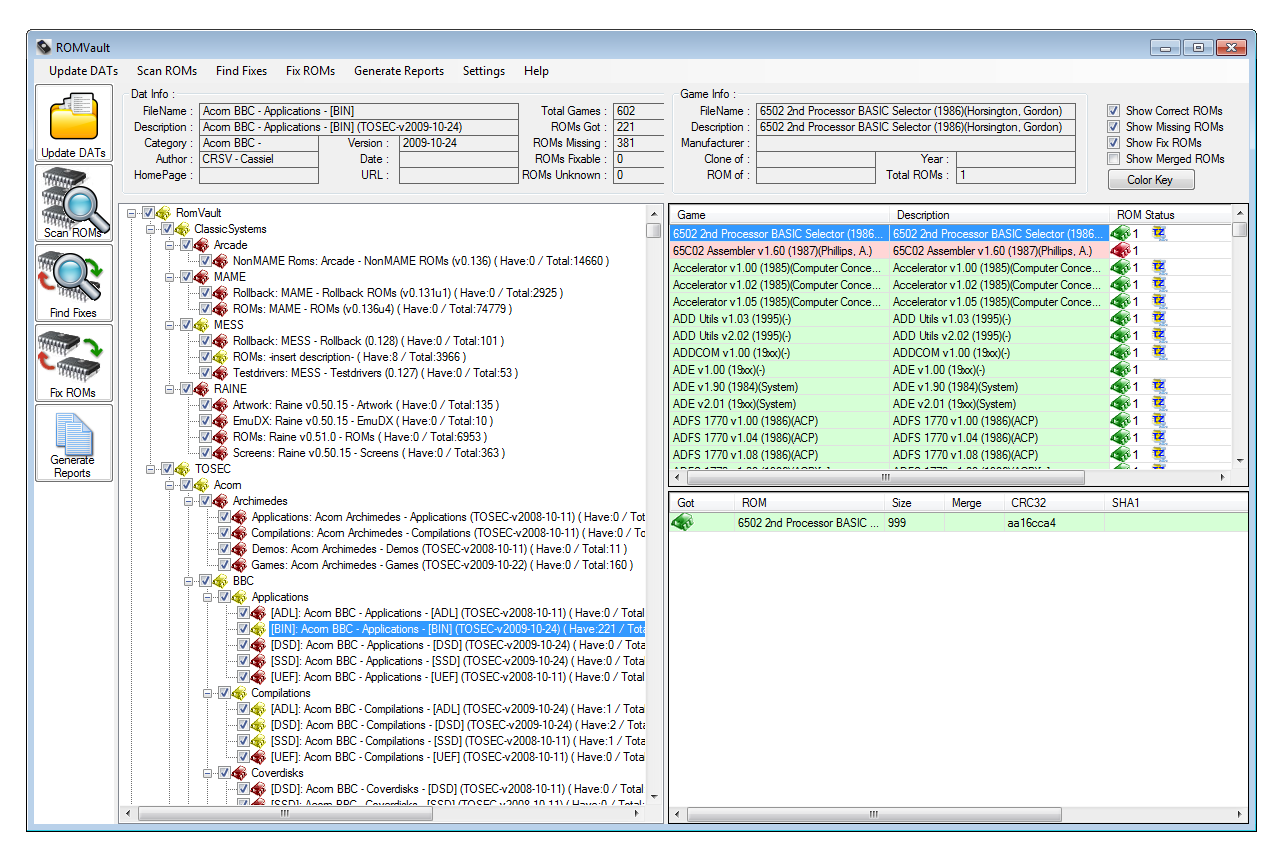
Screen Shot
Downloads:
Latest:
RomVault V3.7.4
CommandLine Version:
RV CommandLine V3.7.4 Windows
RV CommandLine V3.7.4 Linux
Trrntzip:
Trrntzip Utils Page
RomVault Wiki
Join me on Discord
Others:
TorrentZip File Format
7-Zip File Format
Email Me
Support ongoing development:

For a very quick 'How to use RomVault' Scroll down to the very bottom. (Read April 12,2010 post.) or watch This YouTube Video
Also Visit the RomVault Wiki for many more details of RomVault usage.
Are you sourcing your DATs from DATVault? All your DAT needs updated multiple times a day in one place.
Don't miss out on all the latest from RomVault join Discord
April 21st, 2025 - RomVault 3.7.4 Release
A public update is finaly here, I know its been a long time coming, but sometimes life takes you an a different path, and releases take their time to arrive.This release has a number of nice bug fixes, also now supports File Only Directories (ZipAsFile). A very nice simple addition is reporting % completion when scanning large files. Plus many more core cleanups (Trying to keep the code up to date.) Also added is a built in .nfo file viewer, which is a kind of cool addition.
Well there are probably lots more features and fixes I should mention in this release but just wanted to get this version out to you all.
Here is release 3.7.4
June 25th, 2024 - RomVault 3.7.2 Release
Another quick RomVault update coming at you. Main fix was fixing a bug causing a bad cache file when making Fix Dat reports, but there many other smaller features and fixes, including a new show incomplete filter button in the top right.Here is release 3.7.2
May 7th, 2024 - RomVault 3.7.1 Release
With such a big feature release as 3.7.0 there where bound to be a few loose ends needing cleaned up, and so...Here is release 3.7.1. Please checkout the Wiki for the list of feature updates and bug fixes.
(Thanks to Johnsanc for doing such a great job on keeping the wiki up to date.)
April 2nd, 2024 - RomVault 3.7.0 Release
Excited to anounce the release of V3.7.0! One of the biggest feature update releases in a very long time.This feature update list has been driven by two main big features adds:
Total DOS Collection, Date/Time
Originally there was trrntzip formated zips, this format has served up well for many many years. It uses deflate compression (level 9) and a fixed date time of: 12/24/1996 11:32 PM Rumored to be the date MAME was first released! So I have been working closely with the main guy over at the Total DOS Collection for about the last 6 months (Thanks for all the great collaboration efforts), and am very please to anounch the first big upgrade to the zip format is TDCZip (Think of this as trrntzip with date/time support.), this turned into quite an adventure to get all the TDC zips supported in RomVault. Including discovering that ZIP's original date/time storage can and does store potentially invalid date/times suck as 1990/00/00 00:00:00 = month 0 , day 0, and invalid time can also be stored. Also had to rework my code support for code page 437 (as used in early zip filenames) as it turns out .NET's version of this code page does not correctly support the ASCII values below 32.The daily Total DOS collection DATs will now also be included in DatVault updates. DatVault will also contain a RomVault corrected TDC Release 21 DAT (Please don't try using the numbered release DATs from TDC, they are honestly a mess.), and also a daily Diff dat with just the news files in the Daily compared to the Release 21 DAT we be available in DatVault.
ZSTD Compression
So while re-working the zip format it was also possible to add the next big update to ZIP... zstd compression zip. This timing turned out to be just about perfect as MAME can now support reading zstd compressed zips!What is zstd? It is a new compression methods invented by facebook devs, compresses better that deflate, compresses faster than deflate (With multi-threading compression!), and decompresses at crazy fast speeds, so it is win, win, win all the way around.
Also WinRAR 7.x and 7zUI v24.x also now support zstd compressed zips, so zstd zip is now a very well supported compression system.
So we now have what I am refering to as Structured archive formats:
These are now the 3 supported structured ZIP formats in RV, but wait... theres more.. lets not leave out 7Z!
7Z got a big upgrade also, now supporting 4 different formats:
As well as these two main features, there have been many equally imported enhancements such as better file fixing source priority selection, and better handling of zero byte files, now meaning zipmove can be used in more places.
Dark UI mode has been hiding in RV for a while, but has officially been added to the config UI.
TrrntzipUI becomes S.A.M. Structured Archive Maker
With the arrival of more than just Trrtnzip, TrrntzipUI also needed an overhall, and has officially been renamed to Structred Archive Maker, It can now recompress all of the above structured archive formats. (With the exception of TDC, because you need to DAT to get the Date/time correct.) S.A.M. is now available from the RomVault top menu, and the stand along version will be released here soon.And..... just because people do ask for it: The command line versions for windows and Linux got an update with all the new v3.7 features.
Thanks again for all the support, and help from my great freinds over in RomVault discord This great releases would not be what it is without your help and support.
So here the detailed list of all the updates and bug fixes in V3.7.0!
Feature Updates:
Bug Fixes:
January 9th, 2024 - RomVault 3.6.4 Release
Another quick bug fix release: Stopped rv7z files recompressing for no good reason, and added some missing icons in the rom grid. RomVault V3.6.4January 4th, 2024 - RomVault 3.6.3 Release
Happy New Year everyone, Here is a new update release RomVault V3.6.3.It has been 6 months since the last official release, so I figured it was time to get out a new year release.
Many changes and bug fixes in this release, to many to mention here, so please head over to our WIKI Page, for the full update log.
Yes I did make a V3.6.2 release on Christmas day over on our Discord channel, but you should now download V3.6.3, as V3.6.2 had a few to many bugs discovered in it after releasing.
June 23th, 2023 - RomVault V3.6.1 Release
Hot on the heals of V3.6.0 comes RomVault V3.6.1.Thanks to all the great community over in the discord channel for their great testing feedback and some bugs reported found and fixed.
Found some more memory issues in the new CHD C# code which has now been fixed
and a couple of missing fixing status's in the new keep only complete sets have been added as needed.
So the CHD scanning code is now flying!!! Go download V3.6.1 and try it for yourself. (No chdman.exe needed!)
June 16th, 2023 - RomVault V3.6.0 Release
Very happy to announce the official release of RomVault V3.6.0This release comes with a number of big feature updates over V3.5.0:
| New Features | |
|---|---|
| CHD built in support | Chdman.exe is no longer needed!, RV now supports reading all CHD Versions, and compression. (Thanks to a number of people over in the RV Discord Channel for help out making this one a reality.) Along with the CHD scanning being built in a lot of work has been done to make this use parallel processing code, to give somewhere around a 3 to 4 times speed improvement in scanning over chdman.exe!! |
| Keep only full sets | There is now a directory option to only keep full game sets. Any incomplete sets will not be fixed, meaning no more dirs full of 1000's of cue files and no isos. |
| ZipMove improvements | ZipMove is now used in more cases where possible, zipmoving zips even if they are not complete, but are best available. |
| No-Intro DAT Improvements | Support for Parent/child and Numbered No-Intro DATs have been added, so you can do all of these styles from the one source No-Intro DAT's, and use dir options to set your style preferences. |
| Don't stop scanning | A number of scanning errors are handled better now, previously they would stop the scan, now they are reported as errors, and the scan continues. |
| Bug Fixes | |
| DatVault Linux | Datvault has been fixed to work in Linux. Check Boxes working correctly. |
| Added some missing headers | Added lynx.xml & a7800.xml header support. |
| Missing files cannot have alt values | Finally tracked down a cause of this error, and fixed it. |
| Fix case sensitive FS issues | Fixed some issues to make case sensitive file systems better supported. |
| Duplicate directories occurring in the tree | Fixed a bug that allowed multiple dirs of the same name to appear in the tree. |
| ToSort default dir | If removed it can be added back in as a relative path dir. |
| MIA in FixDats | Added the MIA flag to fix Dats. |
Full details lists of features and bug fixes can be found here: romvault.convas.io
March 27th, 2023 - Have you joined discord?
Have not updated here lately, but wanted to let you know there is always a lot going on with RomVault & DatVault.Several WIP versions have been released in the last couple of months. Best place for the latest RomVault news is over in the Discord server channels. Hope to meet your there.
December 24th, 2022 - Merry Christmas
Merry Christmas everyone, Here is my Christmas RomVault Release V3.5.2Over the last couple of months I have just been squashing bugs like crazy, plus a few small features added along the way. Thank you to my dedicated WIP testers for assisting in tracking and testing all of these bugs.
You can see the full details of all the fixes Here on Convas
Plus a few features adds Over here
New Features
Bug Fixes
Just a couple of bug fixes... LOL... Merry Christmas to all.
October 24th, 2022
Just released V3.5.1, A very long list of bugfix and feature additions can be found Here.From experimental Dark mode! To opt-out/Anonymous option for MIA reporting, plus a lot more.
July 4th, 2022 - Happy Independence Day Release
Happy Independence Day to all USA RV Users, and to celebrate I am releasing RomVault Version 3.5.0.There are so many new features and bug fixes in this release I will not even fit them all in here, some of the top new features are:
I could go on, but I think you get the idea, a lot of nice new features, Check out the Change Log report here. Click in the downloads over on the left to grab this latest version.
More on MIA: MIA information is now supplied in the DAT files. No-Intro now includes this in their DAT's. Patreon DATVault users will be able to take full advantage of MIA as DATVault now adds MIA data to all of it applicable DAT, so for the full MIA system (Beyond No-Intro) you would request to head on over to DatVault and sign up on Patreon.
April 30th, 2022
Have you tried DatVault Yet? Sign up and you will be donating to Ukraine.Sign up in the month of May and I will donate your May Patron payment of $5 to humanitarian aid help in the Ukraine.
So you are really donating to help the country of Ukraine, and getting your first month of DatVault for free.
And if you decide DatVault is not for you, you can always cancel after the first month is up.
March 8th, 2022
Clip board copy from Grid with right click.RomVault 3.4.5, For DatVault users, auto scans in the Cue files now, so you don't have to remember.
You can see the full list of changes in 3.4.5 here in the whats new
February 20th, 2022
Have you heard about
Just click over to DatVault scroll down a little and just see how many DATs are updated in an average day!!Then ask yourself... How are you keeping up with your DAT updates?
January 31st, 2022
To Header, or not to Header? Thank is the question.RomVault 3.4.4, now has a directory level option to control headers in DAT. (Force/optional/ignore.)
You can see the full list of changes in 3.4.4 here in the whats new
January 6th, 2022
Happy new year to you all!Hot on the heals of v3.4.2 comes...... v3.4.3!!
Please see the What's New page over on the ROMVault Wiki for the bug fixes and updates in this release.
This is a big update for DATVault users, now means DATVault can support suggested DIR's for each new DAT. That means TOSEC can be downloaded into the TOSEC recommended DIR structure directly from DATVault!
There are a few other quality of life bug/improvements also. As always you can download this latest version from the link over on the left.
(TOSEC DATs will be added to DATVault in the next few days.)
December 25th, 2021
Merry Christmas to all, and a Happy New Year.Here is my Christmas gift ROMVault 3.4.2, and is this one a big release!!
Check out the What's New page over on the ROMVault Wiki by far the biggest ever list of Feature Updates & Bug Fixes.
My thanks goes out to @johnsanc for putting this wiki page together. (Including back filling it with all the changes of many past releases.)
2021 has for sure been a crazy year, and I has so much more cool development plans to come in 2022.
Please enjoy this new version, and remember each line on the whats new and bug fix list is hours of development time, and yes this is my hobby,
but you can always show your appreciation by clicking over on the donate button, or even better sign up on Patreon and get DATVault access included!!
How are you keeping up with your DAT updates? Click over to DATVault, scroll down and take a look at the daily update logs, and just see how much you are missing!!
November 15th, 2021
Time to automate your DAT downloading with: DatVaultWith the release of ROMVault V3.4.1 DatVault has been updated with a new UI to enable updating many of your Dats with just a couple of clicks.
(DatVault helps support the development of ROMVault by being available through a Patron subscription.)
A couple of other Bugs have also been fixed in V3.4.1 the 7z cache has been improved, and a couple of UI crashes have been resolved.
October 25th, 2021
Time for an update release with a bunch of good features updates included:Go download the update here RomVault V3.4.0
July 4th, 2021
Happy 4th of July Everyone, and to celebrate here is the big new V3.3.0 RV Release, with one of the biggest whats new / bug fix list in a long time:Big updates:
The RV UI can still be used will Scanning/Fixing
Added in most ZIP de-compression methods (all that I have ever actually see in the wild.)
0 - The file is stored (no compression)
1 - The file is Shrunk
2 - The file is Reduced with compression factor 1
3 - The file is Reduced with compression factor 2
4 - The file is Reduced with compression factor 3
5 - The file is Reduced with compression factor 4
6 - The file is Imploded
8 - The file is Deflated
9 - Enhanced Deflating using Deflate64(tm)
12 - File is compressed using BZIP2 algorithm
14 - LZMA
20,93 - (Supported, with external DLL) Zstandard (zstd) de-compression
98 - PPMd version I, Rev 1
I do not belive there is any other C# library anywhere that supports this many ZIP compression methods, I hand coded a number of these more obscure de-compression methods myself from scratch!
V1,2,3,4 (Compression method <3) CHD's are now supported/scanned internally within RV's own code. (latest ChdMan does not read V1 CHD files.)
Scanning level 2 is now the default scanning level, you can Scan at level 1 & 3 from right click menu on the tree
Now using a nice new cleaner looking RomVault Logo.
Other Fixes:
Can now sort on more columns in the game lists
Worked on Case Sensitivity issues while fixing files.
Fixed a t7zip checking bug for bigger that 32bit t7zip files
Re-worked Checking for Fixes with Zero Length files, so fixing workes faster with zero length files.
Fixed: If an archive contains all the correct files, and then there is a DAT update that changes only the character case of any of these files, then the archive is still marked as good and the files are not renamed to the proper case.
Fixed: If a set needs a fix from an archived file with the “incorrect character case” issue above, then a file system error is thrown when that fix is attempted.
DAT's that named the CHD's with the extention are no longer named file.chd.chd
Cleaned up the Color Key Help Form
Go download the update here RomVault V3.3.0
RomVaultCommand.exe - Command line version
I am now compiling RVCmd using .NET Core 3.1, and as such there are now native Windows-x64 and Linux-x64 builds!!
CommandLine Version:
RV CommandLine V3.3.0 Windows
RV CommandLine V3.3.0 Linux
And a little reminder, these updates takes hours/days/months of development.... Please go click the donate button over on the left.
And if you really want to support on going development (Yes there are so many new ideas still to be added.) Please click the 'Make this a monthly donation' tick box on PayPal.
Would a couple of (or maybe five) Dollars a month be so bad? (Thats like one cup of coffee......Pick your guitly pleasure equivalent. :) Thank You!
April 26th, 2021
One bug leads to another... so while deep testing the V3.2.4 version I found a different logic problem going on while fixing. (This one have been around for about 5 months.) And while talking to some others on Discorde another problem with case sensitive file systems showed up, so that also got a fix. So go grab V3.2.5April 23th, 2021
Another edge case bug squashed (Unknown status in double check delete.), and a nice little speed up while fixing (Found a way to get the code a little more parallel). Both added to this release. V3.2.4April 8th, 2021
Found a small edge case crash when fixing 7z files, thanks go out to the user over in my Discord Server for setting me up with an example of the crash. It always makes it so much easier when I can see a reproducable crash setup. So go grab 3.2.3January 26th, 2021
Somewhere in the last few releases a bug crept in causing zipped file to not be fixed if only the case of the rom name in the DAT set was changed.This has now been fixed in release 3.2.2
After you install this version you should 'Shift/Right Click' on the Update DATs button to fully reload your DATs, doing this will make RV find any incorrectly cased zip files.
If RV finds any you can then 'Find Fixes' & 'Fix ROMs' to correct these Zip Files.
To read more about 'Shift/Right click' please see this Wiki page: Wiki Side Buttons
December 24th, 2020, Merry Christmas
Merry Christmas everyone, and to celebrate here is an update with some nice bugs fixed.And a fun version number to... V3.2.1 , Download link over on the left, and wishing you all a Happy New Year.
November 26th, 2020
Happy Thanksgiving everyone.... here is a new release V3.2 with a lot of nice updates and fixes, many thanks to all that gave great feedback and help track down bugs with me.If you have any questions about this update, head on over to our very active Discord Channel, for help and answers to your questions.
RomVault 3.2.0
Added new Single Archive Dropdown settings to add Single Archive Types:Switched to a faster un-Deflate Stream so de-compressing zip files is now faster.
Big speedup to the fixing report window.
Stopped RV from trying to use chdman.exe on V1 CHD's (as chdman.exe no longer supports reading them.)
Fixed a bug where locked (read only) directory did not set files to read only, (just the zips.)
Fixed a bug where not all zipped files where being deleted in a fix, and a second fix was needed to delete them.
Fixed a bug reading unicode names from zip file
Fix a bug of DOSCenter Dat File Reader where the filename contained the word size.
Added a try catch to Get Directory Info, to stop RomVault from crashing out if the Directory could not be accessed.
Fix a dat reader bug where un-needed directory enteries where not correctly being removed from the DAT's while loading.
There is also a matching Trrntzip.net update to match this release.
Command line versions will also follow soon.
And as always if you enjoy these updates please concider hitting the Donate button, or even better become Patron.
September 9th, 2020
Introducing RomVaults brand new Wiki!!
It has been a long time coming but finally RomVault is getting some good documentation.(Thanks also to #Johnsanc, for helping with content.)
There are still more pages to complete, but it is a great start. RomVault Wiki
September 2nd, 2020
Here is a page explaining how to build your own mame Split/Merged DAT sets from the mame listxml export. click hereAugust 4th, 2020
Releasing V3.1.4. This is a small but important bug fix release. I discovered a bug that was preventing RomVault from correctly reading some ZIP files with unicode file name and instead reporting them as bad zip files, this has been fixed in this release.July 20th, 2020
Here is a bug fix update with a bunch of crashes fixed, lots of good user feedback helped in tracking down and fixing crashes in this release .Including:
Fixed a bug if no ToSort directory exists, or if there is already a files with the same name in tosort.
No longer load DAT if the DAT contains no files.
Changed the encoding used for ZIP filenames and now only using unicode zip filenames if the filename does not fit the encoding 437.(Original IBM PC encoding.)
Using a newer .net version that permits //?/, so can add //?/ and call the .net function now, instead of having to call the file kernel dll's.
Switch from ILMerge to ILRepack to make the single .exe files for the releases. ILMerge does not work with .net core, which I plan to try using at some point.
Fixed a crash bug in 7z files when there is a zero byte file by itself in a 7z file.
March 13th, 2020
I just found a very edge case bug in the ZIP64 writing code. If RV made a zip file smaller than 4Gb, but that had more the 65536 files in it then the ZIP64 headers where not being written correctly to the file. Strange thing was that WINRAR did not even report this as a bad zip. But RomVault itself would read this back as a corrupt zip.All projects using ZIP have been updated to resolve this bug. (RomVault, RVCmdLine, Trrntzip.UI & Trrntzip.Exe)
March 11th, 2020
RV 3.1.1 has just been released, In V3.1.0 I removed the ability to set Directory settings on DAT's, as it could cause some config issues,I have now fixed these issues and added the ability back again.
Also removed illegal characters from extra directory names. (This was becoming a problem when using description as directory name.)
February 25th, 2020
RomVault development has been very active lately, and there have been some big UI performance improvements added in the last month.So with that it is time to do a .1 version update... So today I am releasing RomVault V3.1.0
Also there is a new link over on the left for RVCmd!! This is something a few people have been asking for.
If you have any questions about how to use this (or anything else) you can find me in the Discord Channel Here.
And finally: Please remember this is a personal project I probably spend way to much of my own personal time developing.
Please show your appreciation for these efforts by using any of the buttons on the bottom left. (Thank You)
I know some of you are probably looking for a what's new list.. Well the closest thing I have to that is right Here
January 24th, 2020
RomVault 3.0.49, bug fix Release. Biggest change is 7z extract caching is now always on, and a cache bug was fixed in that code.Fixed a reporting directory name bug, in unzipped files with directories in the filename. (was just a UI thing.)
Fix DAT's now do not add a description if there was no description in the original DAT.
And you can now make a Fix DAT from any level in the tree by right clicking on the Tree.
Also one other thing. This website is now using https, so happy safe browsing.
January 5nd, 2020
Just put together RomVault 3.0.48.Fixed some new UI Issues, with reporting un-need stats in the ToSort Dirs.
Also have done some internal work on the DAT readers so that this version will produce Compatible MAME DAT sets for the -listXML output from a Mame.exe
I am planning on making a new Video or two in the next couple of days to explain this a little more.
January 2nd, 2020
Happy New Year everybody. Here is a shiny new 2020 build of RomVault 3.0.47.Fixed some UI Issues.
Fixed the 'Don't Add Multi DAT DIRs' as I added the button but never added the code to use it. Woops.
Also Re-structured some 7zip code, ready for some future development.
December 12th, 2019
RomVault V3.0.44, if you are using Directory mapping you should switch to this version, as there was a bug in previous version that could screw these up.November 26th, 2019
RomVault V3.0.43, a few more bug fixes, mostly to do with level 1 scanning and fixing, plus corrupt 7zip's are dealt with better.November 10th, 2019
RomVault V3.0.42, a few quick fixes, fixed a UI crash when scanning DAT's, also made it so that you can copy and paste from the UI info boxes, you can also now map directories to network paths.November 9th, 2019
RomVault 3 official Release is Here!! V3.0.41, is now official. Happy rom sorting everybody!This release contains a couple of bug fixes when the files are changed while fixing and so should not crash because of this now, and stores the chkboxes in the UI in the settings file.
Please note this updates represents 100's of hours of personal work over several years of development, please consider hitting the donate button over on the left at the bottom.
October 18th, 2019
RomVault 3 RC 10, Bug fixing release, handles corrupt 7z files better now, and also corrected a couple of data issues with header dat sets.September 30th, 2019
RomVault 3 RC 9, Return on Linux / Mono support, fixed a couple of directory separator issues, so that Mono RV should now work again, please let me know if it is working again mono users.September 24th, 2019
RomVault 3 RC 8, Added back support for DAT that have rom files and CHD files, and CHD in the mame software list dats, There is a new dropdown in the directory settings where you can choose which type of file you want to keep from the DATs.September 19th, 2019
RomVault 3 RC 7, Some more bug fixes and code cleanup.I am now on a missing to fix the error: Object reference not set to an instance of an object , when reading in DAT files.
If you have seen this, could you please let me know which DAT's you are reading and what merge/compression settings if any you have set for these DATs, Thanks
I am trying out a new way for people to get in contact with me, I have started up a discord server you can join it right Here.
September 17th, 2019
RomVault 3 RC 6, should have both the bugs from September 11th squashed now! Also some more drive mapping compress rules bugs has also been fixed. Please do report anything you find, none of these bugs would have been fixed if it was not for your feedback guiding me into the cause of the bugs. So Thank you to all that have emailed and helped out.September 12th, 2019
RomVault 3 RC 5 With bug #2 from yesterday squashed. Now please send me you logs and lets see what else shows up to get fixed.September 11th, 2019
Small bug fix setting compression rules in DAT files was fixed in RC4.Please help report bugs
There are a couple of crashes I am trying to track down that I cannot reproduce but I see them coming in from the error logs.1: __RomVault.tmp tempZipOut was left open
2: Source and destination Size does not match. Logic Error.
If you are seeing either of these errors happing, or anything else that is repeatable. I need your help to fix them... Please upgrade to RC4, so I am getting the full log reporting and then also click on 'Settings' in the top menu bar, then 'RomVault Settings' in the dropdown menu and then in the dialog screen check that 'Debug Log Enabled' is ticked on.
'Settings'--->'RomVault Settings'--->'Debug Log Enabled = Checked'
Then run a fix again to reproduce the error you are getting, and then you should see a 'Logs' directory created in the same direction as the RomVault.exe, please send me the log that was datestamped to be the error you just captured, and send (email) this log report. Thank you.
PS. Bug 2: size does not match, has already been reported....bug found... and fixed... will be releasing a fix soon.
Nice when the system works.!!
September 7th, 2019
RomVault 3 RC 3 is now ready for download, I believe I have the drive re-mapping working correctly again now.September 5th, 2019
A major bug was found in RC2, it has been taken down until the problem has been resolved, please use RC1 until problem is fixed.
August 31st, 2019
Over the last 2 or 3 years Romvault has been developing into what is now RomVault 3. It started of with the want to include file header detection and fixing. (as used in No-Intro DAT's) and developed into a major core re-work also pulling the core apart into cleaner libraries. Any time you pull some code apart and add a bunch of new features lots of new bugs tend to creep in along the way, which is why it has been the length of development it has been. So now I believe V3 has got to a point where it very much more stable again with a ton of new features over V2. Now there are a few things still being cleaned up, and also a big list of future development, but I wanted to get V3 out to a larger user base, so here it is!!! In the next day or so I will probably also work on a what's new list for V3. So please try it (Yes it will make a new cache file and so a full rescan will be required if you are switching from V2.) And as always most of the bug fixes come from the userbase reporting errors to me, so please keep them coming!!!Also the RC version does still ask you to register your email at the startup this is because V3 reports crashes back to me with your email, So if I see an interesting crash I can then contact you to try and understand what cause the crash, so we can work together to resolve the bugs.
June 11th, 2019
Looking for more RomVault 3 Beta testers, if you would like to give it a try and help out the development effors please head over to the Beta Website to give it a try. I am now in a phase of bug fixing it as much as I can, so I can go fully public with it, so your help really does make a difference.May 7th, 2019
So with the Beta version of RomVault 3 getting closer each day to being the official build, I thought it was a little over due to put out the source code for RV2.6.3 (I had not update the public RV2 code for over 2 years.)So head over to GitHub if compiling your own RV2.6.3 is your thing, and also become a beta tester of RV3 and report bug back to me. (Oh Yes... and support on going open source development.... Become a patron, link over on the left.)
April 11th, 2019
I have a quick question for all you RomVault users out there: Please complete my 1 question survey Thanks.July 26th, 2018
There was a very edge case bug reported in the zip compression with files right around 4Gb's in size, and it was corrupting these zips. So I have fixed the problem, and released a bug fix update. So Romvault 2.6.3 is released.Also I have added a new page for the trrntzip utils, it is located here
July 5th, 2018
Things are still moving along over on the RomVault Beta Page. I am hoping to get a beta release out again soon. If you would like early access to the next beta release, you can head on over here: https://www.patreon.com/romvaultMarch 10th, 2017
A very big 'Thank You' to all who have donated to RomVault over to the last couple of months. Your support is amazing, and really motivating me to keep on with RV development.Also this may interest you just to know what 'could' be coming to RomVault as my development continues. RomVault Beta Page
February 9th, 2017
There was an error in my 2.6 releases of RomVault that stopped it working using Linux (Mono), so here is RomVault (2.6.2) which should work again in Linux. This version also contains Delta Filter for 7z files, fixing decompression on .wav files. (Thanks for all the feedback, that has helped track down these problems.).Also on another note... I have added a running total for how much has been donated, via the donate button. Yes, it was just $30 for all of last year, kind of makes me a little sad.
January 30th, 2017
Turns out there was a error in my 7z code when working with non-compressed files inside of 7z files, this is now fixed and here is the quick update. RomVault (2.6.1)So also: To go along with this bug fix there is a new version of Trrntzip.NET (2.5.1) with the same fixes in the compression code.
January 28th, 2017
Today I am releasing RomVault (2.6), RomVault now has the ability to read .7z files in the ToSort directory, I have spent a lot of effort writing a .7z reader in C# to get this working. I have looked around the web, and belive I have now coded into RV the most complete C# only .7z reader that exists, there are others that are close but none that I have found are as complete as I now have coded up for RV. (I guess I should release this .7z C# library as others would probably find it usefull.)Also I have reworked the mame listxml dat reader to make it work correctly again, please let me know how it goes, and if you find it usefull Click my donate button.
So just to be clear, RV still stores its files in the RomRoot directory as .Zip files, so if you wanted to convert you .7z library for MAME into a .Zip library simply put you .7z files into ToSort, then scan and fix, and your files will be converted over to trrntzip .zip files in RomRoot.
I have compiled this release using .NET 4.5.2, so please be sure you have that available on your machine.
November 25th, 2016
I just added a beta release of RV 2.5, I have spent some time restructuring and cleaning up the code, and added some beta test code in the background. So if you want to download this version and test it, please do, but don't go crazy running this version on your main sets, until I get some good feed back, and I make an official release.June 27th, 2016
Had some good code feedback, big thanks to LnmVolbo on Github, so here are those fixes to rom reporting, fix reporting, and sorting by filesize, plus a small bug fix to the multi threaded file checking V2.2.7.May 19th, 2016
The Multi threaded checking is now getting to a good stable point so I have put out a new full release V2.2.6.February 12th, 2016
Finally got around to catching up a little on some other peoples fixes and improvements to RomVault. So here is a test build V2.2.5 it has a few small bug fixes, and the big new changes thanks to edc's input is some multi-threading file hashing, which should give a new speed boost to scanning your files. If this version looks good, I will promote it to the official version in the next few days.To keep up with all the changes you can head over to the source code on GitHub
January 3rd, 2016
Happy New YearJanuary 27th, 2015, ROMVault 2.2.1, Linux Compatible Release
So RomVault development had gone quiet for a while, but during this time some good things have happened, the first thing is that for a while now ROMVault has become an open source project. You can now keep up with the latest code at:GitHub RomVault Repository
And with it now being open source a big thanks goes out to my friend Ack for picking up the code and working on making the needed changes to get ROMVault running on Linux, You need to be running 'mono 3.10+' for it to work. I hope it will not be to long before more good things happen with ROMVault development.
Just so there is no confusion: This is a standard Windows .NET release of ROMVault, compiled to run on your Windows PC just the same as any previouse release. The difference is that this same .exe file will also run on Linux using Mono to run a .NET exe file in a linux OS, There are some code changes in the .exe that detect if you are running Windows or Linux, and then some alternative internal functions are used depending on which OS you are running.
April 22th, 2014, ROMVault 2.1.24
Quick update today, Fixed a couple of bugs in DAT loading, and added a couple of new Meta Data Items for Trurip DATsMarch 4th, 2014, ROMVault 2.1.23
Happy Fat Tuesday, and here is a quick bug fix update, fixed a couple of bug that caused the fix engine to crash when fixing files.Fixed renaming a file if it was needing the case of some characters changed.
Fixed moving files out to ToSort
January 27th, 2014, ROMVault 2.1.22
Update1:Fixed a couple of Bugs. Corrupt CHD's where missing some fix cases, so these should be handled correctly. Also speeded up rescanning directories that contain a lot of files. (not zips).
Update2:
So it turned out that after fixing the CHD bugs in 2.1.21, I looked a little further into the code and fixed a couple more CHD fixing related issues. So here is the next update.
January 7th, 2014, ROMVault 2.1.20
HAPPY NEW YEAR.And after much searching and trouble I believe I have finally tracked down 'comparing null ulong?' error.
You had to have:
a) a missing CHD file that did not give a SIZE in the CHD DAT
b) a missing ROM file that was zero length and so no CRC supplied in the DAT
c) have a fix for the CHD
d) have the order of things so that the CHD would be fixed before the ZERO length file.
And then you got the ulong? error message.
Anyway finally tracked that one down, and put the correct checks in place to handle missing Size/CRC information better.
So go grab 2.1.20, and keep on fixing.
December 23th, 2013, ROMVault 2.1.19
A few more bugs have been coming in with the new version, so a new fix release is already here.Fixes:
Handles Missing DATRoot directory cleanly now.
Added some better error handling to find the ulong null problem
Ignored files being set to incorrect status on Cache Load
Error opening CHD file (<FileName>): decompression error
Please update asap.
December 20th, 2013, ROMVault 2.1.18
Already fixed one bug caused by not having a ROMRoot directory setup when you try and run RV, and trying to track down another bug.If you have been getting the error message 'comparing null ulong?' please download and run this version.
I do not understand what logic is leading to the reason this message is being displayed. So this version will send me a more detailed message about it.
If you are at the point where you can reproduce this error repeatedly, please get a hold of me, I would really like to get to the bottom of this one ASAP.
December 19th, 2013, ROMVault 2.1 Release
Merry Christmas
After a lot of work and testing over the last few months I have decided it is time to release 2.1 of ROMVault.The big new feature of 2.1 is CHD file support. You will need to have chdman.exe in the same directory as RomVault21.exe for the full CHD support to work.
But there have been many more smaller fixes and improvements made, such as continuing to scan passed locked files. (Files locked by other applications accessing them.)
There is also improvements made to the ZIP reading code, that should be compatible with a few more rare zip formats.
What is NOT yet in ROMVault 2.1 is 7Z support, I started adding 7Z support and got a long way into it, but then started running into problems with the way the fixing core was working with 7Z. So for now the 7Z code is not in this release,
I instead worked a lot on trying to get the existing code as stable as I could.
So before I get into another big development cycle to rework the core for 7Z I wanted to get a release out now as I believe it is a lot better than the current 2.0.10 code.
There are a couple of strange crashes I see once in a while, and so this version has some improved error logging so I hope to get these tracked down soon.
A few other notes:
The cache file has changed in this release, so your old cache files will not work!! You will have to re-scan all of your files with this release!!
ROMVault 2.1 will make a new cache file called: RomVault2_7.Cache (This is actually my internal version 7 of this cache file, so that explains the 2_7)
If ROMVault does crash is does send me a log of the crash report, this has helped me track down many bugs in the past, this is also why I ask you to enter your name and email before using ROMVault for the first time.
This way I can contact you back to try and find out more details about crashes I see.
May 23th, 2013, ROMVault 2.1
Been a while since my last update so I thought it is about time I checked in with an update as to what I am working on.The 2 main things I am focusing on are 7Z and CHD support, and the good news is both are coming along well, and both work to a degree.
It has been interesting developing ROMVault now that I have publicly released it, in that I can many times get a version of RomVault together that works well for my own use and as I know the limits of what it can do and what will break it, it works well for my needs, the thing is taking ROMVault to the next level were it will keep working with everything that anybody else can throw at it is another completely different level of developmental robustness and sometime that part of developing is not much fun and not the rewarding part.
So as this is at the end of the day just a 'fun' personal project of mine, sometimes I need to take a break and just work on it for me and keep it fun, which is kind of where I have been for the last couple of months.
So like I said 7Z and CHD support are kind of working, and I will be spending the next while here getting it as robust and possible more efficient before the next public release of ROMVault.
Here is a screen shot of the latest code, converting zip files to torrent7zip files.
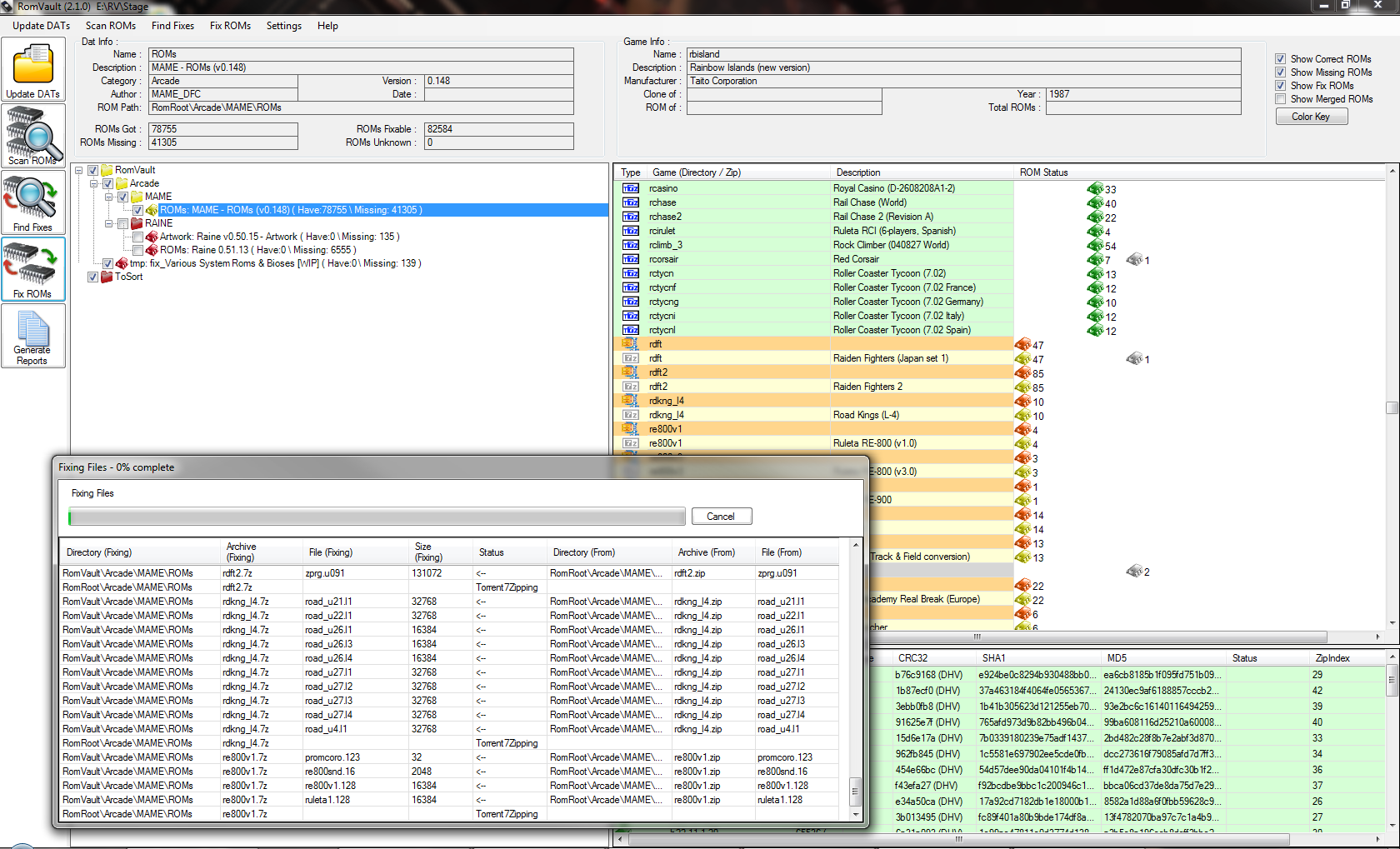
Click on the image for full screen version
February 23th, 2013, ROMVault 2.0.10
Fixed one new bug introduced by the addittion of the <clrmamepro forcepacking="unzip"> code, that was causing an error when trying to fix a zero length file.February 7th, 2013, ROMVault 2.0.9
Couple more bug fixes.Bugfixed: Fixed the 'Unknown double check delete status MoveToSort' bug.
Bugfixed: Fixed the negative totals being reported in the ToSort directory.
New: Added support for <clrmamepro forcepacking="unzip">
January 26th, 2013, ROMVault 2.0.8
Just a couple of small bug fixes today.January 19th, 2013, ROMVault 2.0.7
Lots of things new and improved in this release. Read the what's new to see.I have now released an Images.zip file that if left in the same directory as RomVault2.exe will be used to supply the images to RV.
This means that if somebody would like to pick these up and work with them and make me a set of Color Blind friendly version of these icons, that would be great.
January 14th, 2013, ROMVault 2.0.5
So in 2.0.3 I fixed the code so you could be offline with RV2, but it looks like there was still a problem if my update server is offline, so 2.0.5 should just keep on going either way, also fixed a bug in the miss-list reporting that was crashing RV.January 11th, 2013, ROMVault 2.0.4
Woops let a new bad bug slip into 2.0.3, so is fixed now in 2.0.4, you should now not get the "Could not find self" error message while deleting empty directories.January 10th, 2013, Again, ROMVault 2.0.3 Bug Fix Release
So you may have noticed that ROMVault 2.0 now asks you for your name and email address, (If you did not fill this in please go to Help->Registration and fill it on.)The reason is that ROMVault 2.0 now automatically sends me a report any time an error message or crash occurs, it also sends a message if there is a problem reading a DAT file. So I have already been getting plenty of good crash reports, and emailing people to find out what there where doing to make them happen, and so thanks go out to all those who are already helping make ROMVault 2.0 Better.
This also explains the reason why so many quick fixes can be made right now.
So here is another update with a few more fixed, check the whats new doc to see what has changed in 2.0.3
January 10th, 2013, ROMVault 2.0.2 Bug Fix Release
Fixed a bug where a zero length file would match a No-Dump file and cause pop-up error messages.If you have been seeing an error that looks like ", ZipFile , InDatBad , Got from: Error to: Error", then get this update, and re-scan your roms.
January 9th, 2013, ROMVault 2.0.1 Bug Fix Release
As I like to say... Another day another set of bugs, so here is 2.0.1, fixes and add a few things. I am going to try and maintain the whats new doc, but I am not very good at keeping these things up to date.Also another new feature in RV2 is unicode support.

January 8th, 2013, ROMVault 2.0.0 Officially Released
Hi,So around August time of 2011, I was working with the code of RomVault 1.7 and was starting to get frustrated with the direction it was heading. The biggest problem was that the core data structured used internally by RV1.7 was based around trying to look like the list of DAT that it scanned in from DATRoot. This sounds correct but I was running into problems like this: where do I store the information about any files I find in a directory that is not in one of the DAT directories. The scanning code was starting to do more and more fixing, so that it could complete a scan, like copying unknown directories and files over to ToSort. Also as I am sure all you RV1.7 users know, there was no clean way in the data structure to store the status of the Tree of DATs as displayed in the UI, so it kept on resetting itself, as it was not really a tree structure at all, just a list of DATs displayed as a tree. This was all heading in the wrong direction fast.
So I realized I had the change the core data structure, as what I am really working with is actually not DATs, I am really processing a structure of Files and Directories. (The DATs are just a way of representing the list of files you want to collect.) So I started to rework the core data structure to be a structure that would hold a tree of Files and Directories, and at that time back in August 2011, I figured a couple of months of work, build the new core structure, put all the old scanning and fixing code back on top of it and RomVault 2.0 would be ready to go.
The new core data structure was made, and then I converted over the DAT loader, and then got the File scanner going, and everything was going along good and then I started working on the Finding Fixes code, and then got into a world of CRC's, SHA1's and MD5's, it was probably around 10 months ago we (that’s me and my great Beta testers) realized that just fixing on CRC’s and file size alone was not going to cut it. So after a couple more month Levels of scanning and fixing where born, and then after a few more months Levels of scanning and fixing where about working, and then the improved DAT loader was developed, and oh yes, the Missing report code was never converted over, and then the idea of supporting filenames greater than 260 characters came along, and fast Zip processing was added………..
You get the idea, the project just kept on snowballing. So here we are today around 16 months later, with what is RomVault 2.0.0, with 40'ish private Beta version being tested, about 300 check-ins to the source control. (So that works out at about one check-in every 1.5 days for over 18 months!!!,You did already click on that Donate button over there of the left, I hope.)
Is RomVault 2.0.0 finished? No, nothing is ever finished, there is a great big list of things still to be added to it, but it is a great big step up from 1.7. So before you ask there are 2 things still at the top of the to-do list, so Sorry, there is still no 7z support, and still no CHD support. But I will put this another way, neither of those 2 features would ever have fitted into the 1.7 data structure, and so also look out for the 2.1 development cycle starting. (As I actually already have a private test version of RomVault that does to a limit degree support 7z.)
So you need now to know a little about scanning levels, and how RV works.
First you need to know what a CRC32 is, and to put this as simply as possible it is a 4 byte, 8 digit (in hex) hash of your file, ZIP uses and stores the CRC32 of your file when you put a file into a ZIP, this way when it extracts your file it rechecks the CRC32 to see that your file did not become corrupt.
And here is an old DAT file game description, showing the crc values of the files needed for this game:
game (
name 2020bb
description "2020 Super Baseball"
romof neogeo
rom ( name 030-p1.bin size 524288 crc d396c9cb )
rom ( name 000-lo.lo merge 000-lo.lo size 131072 crc 5a86cff2 )
rom ( name sp-s2.sp1 merge sp-s2.sp1 size 131072 crc 9036d879 )
rom ( name sfix.sfix merge sfix.sfix size 131072 crc c2ea0cfd )
rom ( name 030-s1.bin size 131072 crc 7015b8fc )
rom ( name 030-m1.bin size 131072 crc 4cf466ec )
rom ( name 030-v1.bin size 1048576 crc d4ca364e )
rom ( name 030-v2.bin size 1048576 crc 54994455 )
rom ( name 030-c1.bin size 1048576 crc 4f5e19bd )
rom ( name 030-c2.bin size 1048576 crc d6314bf0 )
rom ( name 030-c3.bin size 1048576 crc 47fddfee )
rom ( name 030-c4.bin size 1048576 crc 780d1c4e )
)
So this CRC32 numbers become a finger print of your file, and RV1.7 used the CRC32 it found in the zip file header and file size to identify your files, so if you have a file in ToSort RomVault would look at the header of the zip file and read all the CRC’s and Sizes from that zip file and if a DAT requires a file that matches that CRC32 and size, then RomVault would move that file from ToSort to the correct zip file as described by the dat.
This is all super-fast an easy as the CRC32 was right there waiting for me to look at in the zip file information.
But here started the problem, the more files you start to compare this way you realize that CRC32 is really not enough, which brings us right up to date with the very latest TOSEC dat sets:
Commodore C64 - Games - [D64] (TOSEC-v2012-12-22_CM).dat
game (
name "Elvira - The Arcade Game (1991)(Flair Software)(M3)[cr MHI][t +2 MHI][a]"
description "Elvira - The Arcade Game (1991)(Flair Software)(M3)[cr MHI][t +2 MHI][a]"
rom (
name "Elvira - The Arcade Game (1991)(Flair Software)(M3)[cr MHI][t +2 MHI][a].d64"
size 174848
crc 298caa9c
md5 71700ed3cf36b0724e0dd8e68fe32ed9
sha1 0dde6ccb17ed13c05f7f3a03ee6d636f5ba56545 )
)
game (
name "Jimbo (1995)(CP Verlag)[cr FLT][a]"
description "Jimbo (1995)(CP Verlag)[cr FLT][a]"
rom (
name "Jimbo (1995)(CP Verlag)[cr FLT][a].d64"
size 174848
crc 298caa9c
md5 92e4a98d8d9c2234c066124765a5192e
sha1 ba3eb11347d159951d94d7a34a3d08c40b6d009c )
)
Two files from the Commodore C64 set, and as you can see they both have CRC of 298CAA9C!!!
Our system fails, CRC is not enough, and so bring on SHA1 & MD5 two other hashing methods, and as you can see much bigger longer hash values with an almost infinitely small chance now of the SHA1 checksum failing to be the correct file finger print.
So now back to RomVault 2.0
Level 1 scanning: still just scans the CRC/Size right out of the headers of the ZIP files, this is super fast, and if you just want to fix a mame set as quick as you can and are about to join the next mame torrent which will fixing anything that may be wrong anyway, then this is still probably enough for you.
Level 3 scanning: this then gets the full set of CRC,Size,SHA1 & MD5 of every file it scans which is unfortunately much much much slower that the quick Level 1 scan, as is has to fully extract every file out of every zip file and perform all of the checksums on every file. (RomVault 2.0.0 does do all of this in memory, so it tries to be as fast as it can.) But does of course guaranty all your files are truly correct.
And then the better Option:
Level 2 scanning: (USE THIS ONE) Level 2 scans every file just the same as Level3, getting and checking the full set of CRC, SHA1 & MD5, and the first time you run a Level 2 scan it will take a very long time, but it also stores the file time stamp of your zip files, and so the second time you run a scan it checks the file time stamp, and if the file has not changed then it does not recheck it, so the second time around it actually goes super fast again, only slowing down to read any new or changed files.
There is also Level 1,2 & 3 fixing, which sort of works the same as scanning.
Level 1 fixing, only fixes comparing Size and CRC.
Level 2 fixing, compares size,CRC,SHA1 & MD5, but will still copy the raw uncompressed data from one zip to another, for speed if it can.
Level 3 fixing, compares size,CRC,SHA1 & MD5, but will uncompress and recompress every file every time.
So with all that said, use LEVEL 2 Scanning, and LEVEL 2 Fixing, and your future should be good.
That’s enough I am done with the introduction, download it, have fun, and I will probably try and make some new videos before to long.
November 13nd, 2012
It may not feel like much is going on with RomVault these days, but I want to let you all know I have been very hard at work on RomVault 2.0 and it is coming along very well, so stay tuned.Also please check out our new page over at www.facebook.com/romvault
September 2nd, 2012
I have created a how to use RomVault to join a pleasuredome mame torrent video:Please email me if you watch these videos and find them usefull
July 19th, 2012
Big THANKS go out to emuDrache for him offering to host www.RomVault.com, These pages should be faster loading and more available now. (Thanks again)June 8th, 2012
Just updated RomVault to Version 1.7.1, it fixes the bug where the first character of the directory and filenames are being lost in the ToSort Directory if you have set your ToSort Directory to point at a root directory (Like D:\)Also, I know I have been quiet for a while, but I am still working hard on RomVault 2.0, but still need to find time to get this to a point where I can get a beta version out to some people. (If you want to be a 2.0 beta tester let me know.)
February 7th, 2012
Here is a new release of RomVault (Version 1.7) It adds larger file support. Using Zip64 You can now store files bigger that 4Gb. It also fixes a DAT scanning issue where .DAT files are being release with a .XML extentions. The link for this download is over on the left.January 21st, 2012
For anybody interested in the inner workings of a Torrentzip file I have written a document explaining the torrentzip standards. You can download it here.December 3rd, 2011
Had a couple of bugs show up in the last few days, so here is a quick bug fix release. Please update to version 1.6.6 using the link on the left.Fixed a problem scanning MESSXML DATs and Fixed a problem fixing files if the zip was in a sub directory in ToSort.
December 2nd, 2011
I have created a how to use RomVault Video:November 11th, 2011
Welcome to 11-11-11, and welcome to TOSEC's newest update. I have updated the TOSEC links on the left with the newest DAT's structured ready to be dropped into your RomVault DatRoot Directory.May 10, 2011
There was a bug in 1.6.4 that was giving a "Can not create a file when that file already exist" error when moving files out to the ToSort directory.I have fixed this bug in 1.6.5
April 27, 2011
Turns out there where still some problems with the file copy/move code across drives. So 1.6.4 should now fixed this.(What does this mean.?)
It means you can now right click on the ToSort directory (in the Dat tree) and set it to a location on a different drive, and things should all keep working.
April 25, 2011
Another day, another update.Thanks to everybody who has ever sent me crash reports. I do look at them, and here is an update directly as a result of them.
This version 'should' be a lot more stable when fixing roms. I have added a lot of file checking, and handle unexpected results much better now.
Also I fixed the problems of moving unknown directory if the Tosort directory is on a different volume from the RomRoot directory.
So go download 1.6.3 and let me know how it goes.
April 24, 2011
Updated my TOSEC DATS to the current 2011-04-07 sets.April 23, 2011
Fixed a couple of bugs:Was ignoring Character Case's when scanning, So if you had the correct file but the filenames case was wrong like 'fr' instead of 'FR' it would report this as correct.
Removed extra spaces and the '.' character from the end of rom filenames.
Go grab 1.6.1 from the link on the left.
Feb 25, 2011
So here is a big update. Version 1.6 now supports TorrentZip files. What this means, is that every Zip file that RomVault makes will already be TorrentZipped.There are some other options added if you are not needing TorrentZip support. Click on Settings and you will see a new dropdown:
1) TorrentZip all files (Default): This will make all new files TorrentZip'ed.
2) Fastest: When moving a file from one Zip to another, it just copies the compressed raw data, which is very fast, but if you source zip is not compressed the destination file will also not be compressed.
3) Highest: This re-compresses every file that is moved using slightly different compression from torrentzip which in many cases compresses just a little higher.
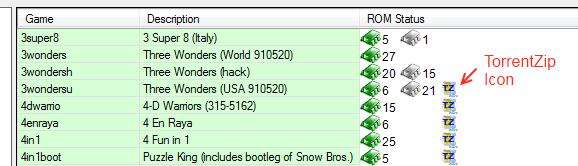
The other little icon to know about is the TZ ZIP icon in the Game List, This lets you know if your Zip file is TorrentZip File.
You can click on 'TorrentZip ROMs' in the top menu, this will TorrentZip all ROM's in the selected DATs.
(You should Scan your roms first, so that RomVault knows which ROMs need to be TorrentZip'ed)
There are still a number of other features I could add, such as just TorrentZipping any selected Directory (to fully replace trrntzip.exe)
Please do send me your feedback, comments and ideas. Contact Me and of coarse that Donate button is still sitting there over on the left of your screen. (Thanks)
Feb 17, 2011
Fixed a bug today that was making corrupt ZIP files if the rom filenames had characters greater than ASCII 127.So everybody should update to 1.5.5 as soon as possible. Also it is possible for me to recover the files out of these corrupt ZIPs, so please contact me if you need help with this.
(I will probably put up a link here soon with some fixed zip files.)
Jan 28, 2011
There was still a bug in reading HEX values from DAT files, I was chopping off one to many characters, so I was converting 0x2000 to 000 instead of 2000, which made the size values come back as 0 instead of 8192Anyway it should be fixed now. So go get 1.5.4.
Jan 23, 2011
Bug Fixed: "Index was out of range" Please download version 1.5.3A bug has surfaced with the latest RomVault 1.5.2. The error message contains the text "Index was out of range".
I am testing a fix right now, and should have 1.5.3 released before the end of the day.
Jan 17, 2011
Just put together build 1.5.2, it fixes a small bug in the MESS xml loader so that HEX numbers can be used.This fixes c64_cart.xml. (Thanks go out to Philippe for pointing out this bug.)
Sept 12, 2010
I updated my Tosec-iso set to match the current tosec iso sets.July 8, 2010
Just added a quick bugfix update (1.5.1):Corrupt zips are now correctly moved out to the ToSort/Corrupt directory.
The zip scanning code now cleanly handels zip files that are open by another application and just marks them as unknown status.
Fixed the MESS XML Dat reader to load the latest NES dat (size no longer needs to be suppied if the status="nodump").
June 28, 2010
So I added another update to RomVault (1.5), the main changes are:Fixed an error on the MESS XML Dat reader. (loadflag="continue" is working in the aes.xml dat)
It now deletes zips out of ToSort as soon as it has finished with them. (Saves a lot of HD space while fixing.)
June 24, 2010
Updated the Tosec-ISO set to include the latest Dreamcast updated.June 04, 2010
Just to let you all know, I have not disappeared completely, I am working hard on adding Non-Zipped directory support, this turned out to be a bigger deal than I had at first imagined, but it is all good I have really been working on separating out the file handling from the ROM Database Sorting Code, so that the Sorting Codes does not have to know the difference between a ZIP and a Directory. It is developing into an interesting exercise in writing the ROM Sorting Class, and a File/Zip Handling Class, and really separating these 2 classes correctly. Along the way I have found and fixed a couple of bug, and probably will introduce a couple more before this is all done. So more work to be done, but it should be a nice update when it is all done.May 25, 2010
Thanks to the feedback from emuLOAD on the RomVault Pleasuredome forum, it was pointed out that I missed a couple of things with the new MESS XML Dats, so they are fixed now, and here is 1.4.1.May 22, 2010
Two new features have been added to V1.4, First RomVault now supports the MESS XML Dat lists. And then secondly I now permit more than one DAT file to exists in the same DATRoot sub-directory, so now (for example) you can just put all of the MESS XML files into one directory and it will create all of the sub directories needed. (using the 'Name' value from the DAT file.)Because of the changes to support the different dats the Cache store has changed so if you are upgrading you will have to fully rescan your DAT's and ROM's.
May 13, 2010
Turns out there was a bug in 1.2 that meant it would not fix files if they are in a sub directories in the tosort directory.So here is 1.3
May 12, 2010
Here is version 1.2.I fixed the tree view to work a little better
And worked a little more on trapping too long filenames
I want to start working on Non-Zipped files and maybe supporting some of No-Intro files that have HeaderBlocks, so it may be a while before my next update, but it should be a good one when it arrives.
April 25, 2010
I have put together version 1.1 with the following fixes:Added WildCards to the Exclude File List.
Replaced the TreeView control, so that I can add Disabled DATs (if the filenames get to long.)
Added Yes, No options to the unknown File and Directory moving code.
Fixed a couple of crashed.
Download it from the link of the left. (I have changed the cache file format a little. so you will have to rescan all of your DATs and ROMs with this new version)
April 15, 2010
Thanks to my good friends over at Pleasuredome, RomVault now has its very own forum.RomVault Forum
Please go and visit and leave any comment, bug reports, suggestions.
April 12, 2010
I have decided it is about time I went public with a release!! Please download Romvault from the link on the left.Here is a very quick get going instructions for RomVault.
Download from the link on the left (RomVault Full DIR's), Make a directory called RomVault and extract the zip into it.
You should now have:
DatRoot This is where you DAT structure will live, I have supplied a few DATs just to get you going, I will update these as time goes by.
RomRoot This is where your ROMS will start collecting.
ToSort you should put ROM zip files in here that you want to sort out.
RomVault.exe Now run this.
To use RomVault you will just click down the big Icons on the Left hand side.
Update DATs Click this first this will read the DAT files in your DATRoot directory, next to try everything out put some test roms into the ToSort directory and then click on:
Scan ROMs This will scan the ROM zips in the ROMRoot directories to see what you have. It also scans the ToSort directory.
Find Fixes Looks at all the ROM Zips you have to find out what need moved where.
Fix ROMs will then make the changes found by the Find Fixes Button.
I have included on the left DAT Zips for the TOSEC sets, you should extract these files into your DATRoot directory, and then click the 'Update DATs' Button, so that RomVault finds them. Then click on down the buttons to scan and fix all of your TOSEC sets.
The rest is up to you.
Please contact me I am very much looking for feedback, I do have a TODO list so please check this out but I also very much want your feedback to make this program as useful to people as possible.
I started working on an early version of this program probably 4 or 5 years ago, trying to fill my own personal need for a program that could handle many DAT files at the same time.
About 2 years ago I started over making a version that I would plan to release at some point, I guess that point has just arrived.
A Final note:
If you find this program useful please use it and have fun. If you would like to help me make it better please contact me with suggestions. If you don't like this program then that is fine keep using your other favorite Rom Management program.
If you find this program really useful then please donate, I have already spent many 100's of hours writing this code, and will probably spend 100's more.
But life is a balance between Family and Work and RomVault Programming time.
And knowing there is a little support coming in for RomVault will enable me to justify spending a lot more time developing it into the future.
Thanks
GordonJ.